Trace Cloudflare AI Gateway calls in Maple
Send every model call that goes through Cloudflare AI Gateway to Maple with the gateway's OpenTelemetry exporter, grouped into one Agent Session per conversation.
Cloudflare AI Gateway can export a trace span for every request it proxies, with the model, provider, tokens, cost, prompt and completion. You add Maple as an exporter on the gateway once, then send a session_id in each request’s metadata. Without it, every model call is its own session.
Point the gateway at Maple
-
In the Cloudflare dashboard, open AI → AI Gateway, pick your gateway and go to Settings.
-
Add an OpenTelemetry exporter and set URL to the full traces URL. The gateway doesn’t append
/v1/traces. EU organizations usehttps://ingest.eu.maple.dev/v1/traces.https://ingest.maple.dev/v1/traces -
Add a header named
Authorizationwith the valueBearer YOUR_INGEST_KEY. Your ingest key is in Settings → Ingestion. -
Leave Content type on JSON (protobuf works too) and save.
Each gateway has its own exporters, so repeat this for every gateway you want in Maple.
Send a session id with every request
The gateway turns the keys in a request’s metadata into span attributes. Send a session_id with the same value on every request of a conversation, such as your chat thread id, and a new one for each conversation. Keys starting with gen_ai. are dropped by the gateway, so gen_ai.conversation.id doesn’t work here.
Over HTTP, metadata goes in the cf-aig-metadata header as a JSON object. With the openai SDK and the gateway’s OpenAI-compatible endpoint, pass it per request:
import OpenAI from "openai"

const client = new OpenAI({
	baseURL: `https://gateway.ai.cloudflare.com/v1/${ACCOUNT_ID}/${GATEWAY_ID}/compat`,
	apiKey: process.env.OPENAI_API_KEY,
})

const completion = await client.chat.completions.create(
	{ model: "openai/gpt-4o-mini", messages },
	{ headers: { "cf-aig-metadata": JSON.stringify({ session_id: conversationId }) } },
)
From a Worker, pass the gateway id and the metadata with the call:
const reply = await env.AI.run(
	"@cf/meta/llama-3.3-70b-instruct-fp8-fast",
	{ messages },
	{ gateway: { id: "my-gateway", metadata: { session_id: conversationId } } },
)
Nest the gateway span under your own traces
Skip this if the gateway is your only source of traces. If your app also sends traces to Maple, pass the active span’s ids so the gateway span lands inside your trace instead of starting a new one. The gateway reads them from two request headers: cf-aig-otel-trace-id (32 hex characters) and cf-aig-otel-parent-span-id (16 hex characters).
import { trace } from "@opentelemetry/api"

function gatewayHeaders(conversationId: string): Record<string, string> {
	const headers: Record<string, string> = {
		"cf-aig-metadata": JSON.stringify({ session_id: conversationId }),
	}
	const span = trace.getActiveSpan()?.spanContext()
	if (span) {
		headers["cf-aig-otel-trace-id"] = span.traceId
		headers["cf-aig-otel-parent-span-id"] = span.spanId
	}
	return headers
}

await client.chat.completions.create(
	{ model: "openai/gpt-4o-mini", messages },
	{ headers: gatewayHeaders(conversationId) },
)
The binding forwards the same headers through extraHeaders:
const span = trace.getActiveSpan()?.spanContext()

await env.AI.run(model, { messages }, {
	gateway: { id: "my-gateway", metadata: { session_id: conversationId } },
	extraHeaders: span
		? { "cf-aig-otel-trace-id": span.traceId, "cf-aig-otel-parent-span-id": span.spanId }
		: {},
})
The gateway span has no tool or agent spans around it. For those, trace your app with its framework guide and nest the gateway under it as shown here.
Check that it works
Run a conversation of three turns with the same session_id. After about a minute, open Agent Sessions and filter by service ai-gateway.
You should see one session named after your session_id, with vendor Cloudflare AI Gateway, a cf.aig.request span per model call, the prompt and reply as a transcript, and tokens and cost in USD. Embedding calls show up as embeddings operations rather than chat turns.
The example below is a two-turn support chat through the gateway, with one tool call in the first turn.
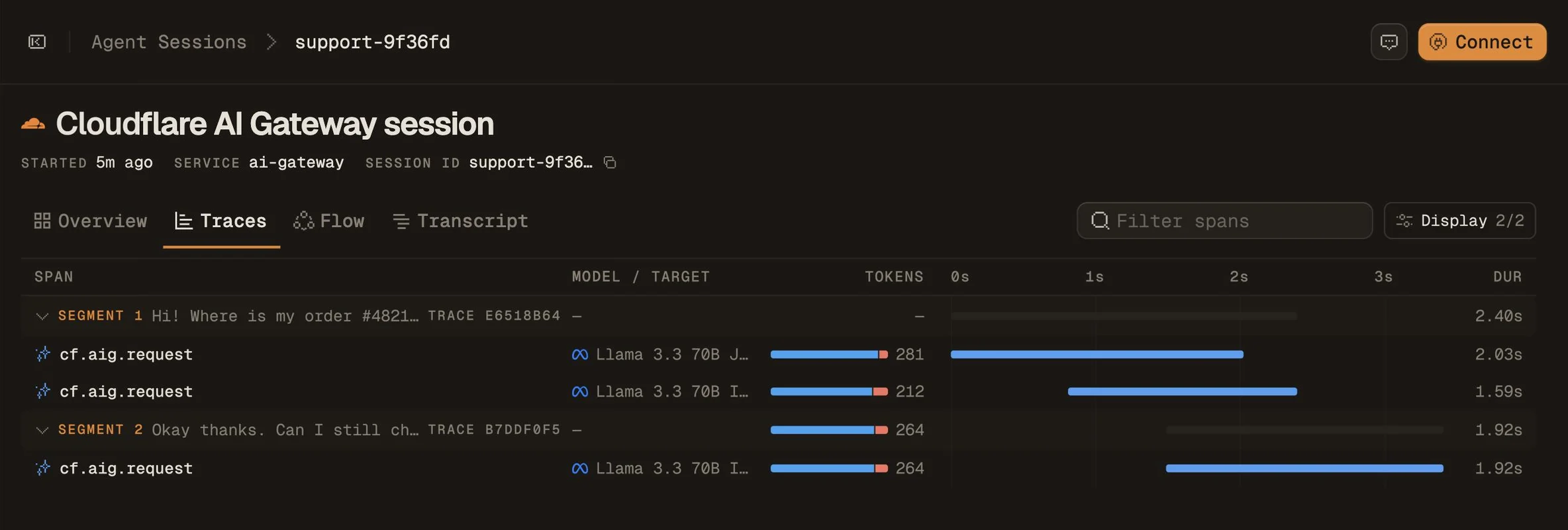
cf-aig-otel-trace-id; every model call is a cf.aig.request span with its model and tokens.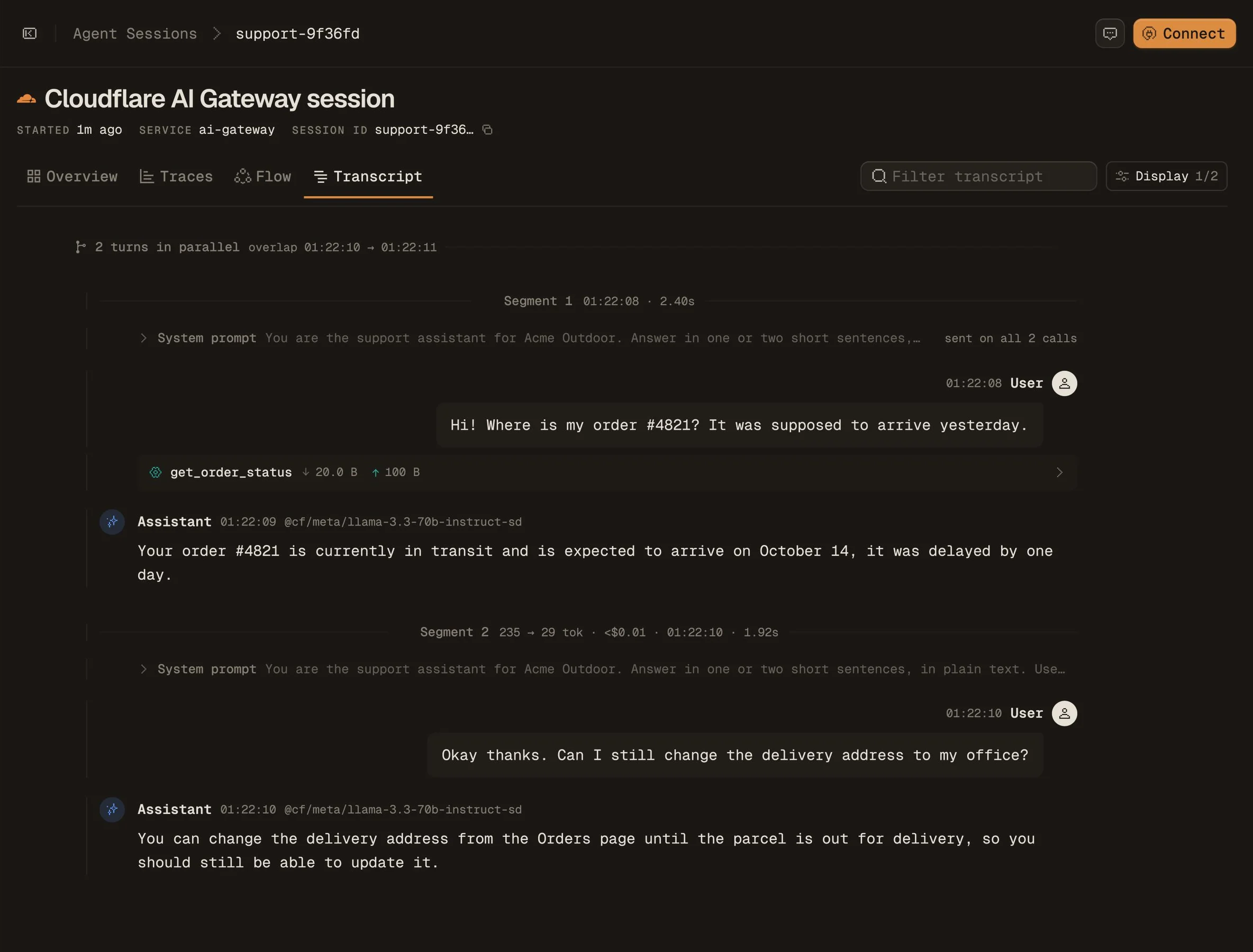
get_order_status tool call.What the gateway doesn’t export
- Cached responses. A request the gateway answers from its cache produces no span, so cache hits don’t appear in Maple.
- Failed requests. A request the provider rejects, such as an unknown model, produces no span. Track failures in your app’s own traces.
- Content controls. Prompts and completions are exported in full. If they must stay out of Maple, don’t add the exporter to that gateway.
Troubleshooting
- Nothing arrives. Check the exporter URL ends in
/v1/tracesand the header value starts withBearer. The key must belong to the organization you’re looking at in Maple. - Every call is its own session, named
trace:<id>. The request has nosession_idin its metadata. Check thecf-aig-metadataheader is valid JSON. - Tokens or LLM calls are about double. Your app and the gateway both record each call. Nest the gateway span with the trace headers as shown above.
Related
- Agent Sessions overview
- AI Gateway OpenTelemetry integration
- Cloudflare Agents, if your gateway calls come from the Agents SDK